



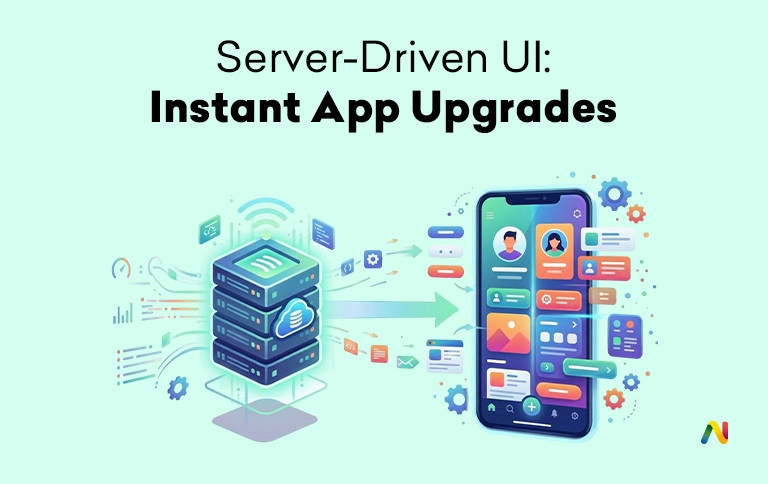
In 2026's hyper-competitive market, mobile apps are expected to evolve as quickly as web experiences. Yet mobile teams still face the App Store review bottleneck, where even small UI changes definitely require a complete rebuild and days of approval. To eliminate this delay, enterprise teams and high-growth startups are adopting Server-driven UI development. This kind of architectural shift enables organizations to modify their applications' interfaces in real time, treating the mobile app as a flexible canvas controlled by the backend.
What is Server-Driven UI (SDUI)?
- The Core Concept: Instead of hard-coding screens in the app binary (which requires an App Store update to change), the server sends a JSON description of the UI. The app simply renders what the server tells it to.
Why Companies Use It:
- Zero Approval Time: Change the "Holiday Sale" banner instantly on iOS and Android without waiting for Apple/Google review.
- A/B Testing: Show a different layout to User A and User B just by changing the server response.
- Unified Logic: Write the layout logic once on the backend, and it updates both iOS and Android apps simultaneously. Top SDUI Frameworks include Airbnb Ghost Platform (Internal tool example), and Spotify Hub Framework, called DivKit (Yandex).
How to bypass App Store review for UI updates
To understand how to bypass the traditional review cycle, one must look at how an app typically functions. Standard apps contain hard-coded instructions for every screen. When a change is needed, the source code is modified, recompiled, and submitted for review. SDUI changes this by moving the structural logic from the client-side app to the server-side backend.
In this model, the mobile application acts as a "dumb" renderer. When a user navigates to a screen, the app requests the server. Instead of receiving only the raw data, the server also provides a detailed JSON schema rendering of the complete view. This schema tells the app exactly which specific components to display, their order, and their styling.
The approach makes room for instant app updates. As the instructions are delivered as data rather than code changes, the app store guidelines allow such updates as long as they do not fundamentally change the app's purpose. By utilizing Design system synchronization, the developers ensure that the server only requests those components that already exist within the local library of the application. This keeps the branding consistent while allowing the user experience to be rearranged at a moment's notice.
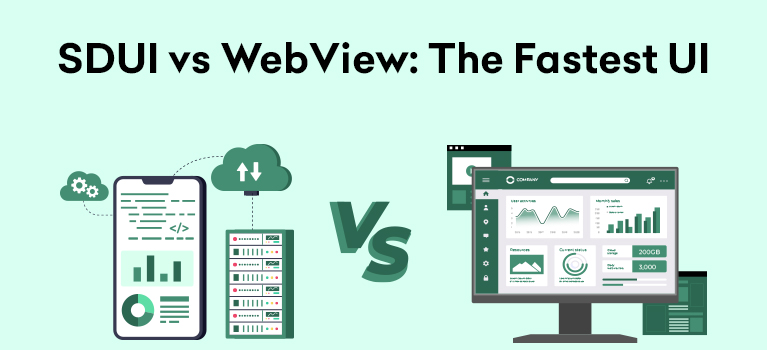
SDUI vs WebView performance comparison
A common question for Hire mobile app architects is why they should not simply use a WebView to achieve instant updates. A WebView is essentially a browser window inside the app that loads a website. While this is absolutely simple to update, it often ends up in a poor user experience. WebViews usually suffer from high latency, inconsistent scrolling, and a lack of the "premium" feel that users expect from a native application.
Server-driven UI development avoids these pitfalls through Native component rendering. Unlike a WebView, which renders HTML and CSS, SDUI uses the phone's actual native building blocks, such as Swift for iOS or Kotlin for Android. Also, when a server sends an instruction for a button, the app renders a real, high-performance native button.
This ensures that the app maintains smooth animations and immediate touch responses. Furthermore, technologies like Airbnb Lottie integration (often used with SDUI) can be utilized to deliver complex animations through the server without slowing down the device. The result is a highly flexible interface that is indistinguishable from a hard-coded native app in terms of speed and fluidity.
Cost to implement Server-Driven UI in Flutter
Implementing SDUI is complex, especially in Flutter, where server data needs to be translated into UI elements. While the long-term Instant app updates save the total amount spent on development cycles, the initial setup clearly demands help from specialized talent.
The cost is primarily driven by the need to hire SDUI developers. The professionals would expertly build a two-way contract between the backend and the frontend. This involves creating a comprehensive component library and a versioning system to ensure that older versions of the app do not crash when the server sends a new UI component that they do not recognize.
In many cases, organizations choose GraphQL for mobile apps to handle these requests. GraphQL allows the app to request exactly the UI data it needs, reducing payload size and improving load times. While the upfront investment may increase the initial budget by 25% to 40%, the ability to perform Dynamic app UI development without waiting for store approvals provides a massive return on investment for apps that require frequent content or layout changes.
Best frameworks for Server-Driven UI (LayoutKit/Litho)
There are a number of established frameworks that exist to help teams manage Native component rendering at scale. For Android-heavy teams, Facebook's Litho is often the preferred choice. It focuses on a declarative UI that is highly efficient for complex lists. On iOS, LinkedIn's LayoutKit provides a fast way to calculate view layouts in the background, keeping the main thread responsive.
Many modern organizations are also looking for React Native SDUI experts. React Native is naturally suited for SDUI because it already uses a bridge to communicate between JavaScript and native components. By extending this bridge to a remote server, developers can roll out updates faster and with greater control.
It is important to distinguish between Remote config and SDUI. Remote config significantly offers help in getting quick fixes, like colors or copy. But with a real SDUI setup, you can change full layouts, introduce new sections, and reorder flows without shipping a new app.
Risks of backend-driven mobile development
While the benefits are clear, there are certain risks to consider. For instance, if the server is slow or goes down, then the app may not be able to render a screen. This requires a robust "fallback" strategy that displays a default UI if the server fails to respond.
Security is also a major concern, as the server is telling the app what to do; a compromised server could theoretically be used to show malicious content. Hire mobile app architects who prioritize secure JSON schema rendering and strict validation to ensure the app only accepts trusted instructions. Lastly, debugging becomes harder because the UI is no longer static. Teams must use sophisticated logging to see exactly what instructions the server sent at the time of an error.
Modern mobile apps demand both stability and speed. Server-Driven UI enables teams to ship data-driven updates in seconds, making rapid iteration essential for any brand in today's digital market.
At Netclues, we specialize in helping companies build the next generation of mobile experiences. Whether you need to find React Native SDUI experts or want a custom plan for Backend-driven UI services, our team provides the technical knowledge to make it happen. We help you take control of your app's future by removing the barriers of the traditional app store cycle.
FAQs
Q. 1. What is Server-Driven UI (SDUI)?
A. Server-Driven UI is a mobile architecture where the server sends UI instructions to the app in real time. Instead of hard-coded screens, the app dynamically renders layouts based on JSON responses, allowing businesses to update interfaces without releasing a new app version.
Q. 2. How does Server-Driven UI avoid App Store approval delays?
A. SDUI updates interface layouts through server-side configuration rather than modifying application code. Since the app already contains approved native components, businesses can adjust layouts, banners, and user flows without submitting a new version for review.
Q. 3. Is Server-Driven UI better than a WebView?
A. In most cases, yes. SDUI uses native UI components, providing faster performance, smoother interactions, and better user experiences. WebViews rely on browser rendering, which can introduce slower loading times and inconsistent behavior.
Q. 4. How much does Server-Driven UI implementation cost?
A. Implementation costs typically increase initial development budgets by 25–40%. However, businesses often recover this investment through reduced release cycles, faster testing, improved conversions, and lower long-term maintenance costs.
Q. 5. Which companies use Server-Driven UI?
A. Large technology companies such as Airbnb, Spotify, LinkedIn, and Yandex have adopted SDUI concepts to improve deployment speed, personalization, and user experience management across mobile platforms.
Q. 6. Can SDUI work with Flutter?
A. Yes. Flutter supports Server-Driven UI through JSON-based rendering systems and custom component libraries. Developers create mappings between server responses and Flutter widgets to dynamically generate user interfaces.
Q. 7. What are the biggest benefits of Server-Driven UI?
A. Major benefits include instant UI updates, faster experimentation, reduced app release dependency, improved A/B testing capabilities, cross-platform consistency, and greater flexibility for marketing and product teams.
Q. 8. Is Server-Driven UI secure?
A. When implemented properly, SDUI is highly secure. Applications validate server responses, enforce schema rules, encrypt communication, and restrict unauthorized UI instructions to prevent malicious content injection.
Q. 9. What role does GraphQL play in SDUI?
A. GraphQL enables applications to request only the data and UI elements they need. This reduces payload size, improves performance, and supports dynamic interface rendering more efficiently than traditional APIs.
Q. 10. What are the risks of backend-driven mobile development?
A. Potential risks include server downtime, increased debugging complexity, dependency on backend infrastructure, and schema compatibility issues. Strong validation, monitoring, and fallback strategies help mitigate these challenges.
Q. 11. Is Server-Driven UI worth the added development complexity?
A. For apps requiring frequent UI changes, personalization, or experimentation, the long-term gains often outweigh the initial complexity. Teams gain flexibility, reduce deployment delays, and improve iteration speed.
Q. 12. Why are companies moving away from traditional mobile releases?
A. Businesses want web-like agility. Waiting days for app approvals slows experimentation, marketing campaigns, and feature rollouts. SDUI helps teams respond instantly to user behavior and market demands.
Q. 13. Can SDUI replace feature flags?
A. Not entirely. Feature flags control functionality, while SDUI controls interface structure and presentation. Many organizations combine both approaches for maximum flexibility.
Q. 14. Does SDUI hurt app performance?
A. When implemented using native rendering and optimized APIs, SDUI maintains near-native performance while offering significantly greater flexibility than traditional architectures.
Q. 15. Is SDUI only useful for enterprise apps?
A. No. Startups, eCommerce brands, SaaS companies, fintech platforms, and marketplaces can all benefit from faster updates, testing capabilities, and personalized user experiences.